
The experience
More than the strategies.
Your membership grows with the strategies. Start with optimised configurations, templates and the resources to get going. As the strategies evolve, the updates are included. Your files, guides, community and support live in one place, and every membership includes a free one-hour session to help you get set up and check everything is right.
Templates
Start from a configuration, not a blank screen.
Templates
Every strategy comes with StratGeeks templates, including optimised configurations to start from. Templates have always been free for StratGeeks members — not an upgrade, not an add-on.
StratGeeks Templates
Official templates provided with the strategies, including optimised configurations. Downloaded alongside the strategy file and used with its setup guide.
Member Templates
Configurations shared by other members inside the VIP member area, kept in their own section so it is always clear which came from StratGeeks and which came from the community.
Free strategy updates
Strategy updates are included with your membership. As the strategies evolve, members get the updates — you do not buy the next version separately. Each release note says what changed, which version is current, whether you need to update, and whether new templates come with it.
The StratGeeks Member Hub
Strategy files, setup guides, templates, workspaces, spreadsheets, updates, announcements and community chat — all in one place.
Look inside →A free one-hour session
Set yourself up first, then use your included setup and review session for questions, anything you may have missed, and a check that your configuration is right.
How setup works →How much control do you want?
Automation without giving up control.
StratGeeks strategies can be run fully automated or used manually. Follow the system as designed, or use your own discretion when a trade is live. Depending on how you are running it, the same strategy covers all three.
Fully automated
The system runs it
Let the strategy handle entries, exits and trade management according to its configured rules.
Discretionary management
Both, one trade at a time
Follow the system while still making your own decisions once you are in a trade.
Manual
You run it
Use the strategy’s rules and signals while making the execution decisions yourself.
One system, a range of use
AutomatedDiscretionaryManual
These are not separate products or separate purchases. They are different ways of using the same underlying system, and you can move along it trade by trade.
Before the trade
Configuration
- Entries
- Exits
- Targets
- Stops
- Filters
- Position sizing
- Other available parameters
During a live trade
Discretion
- Tighten a stop
- Move or extend a target
- Take a target early
- Take a trade off
- Hold it longer
- Close the position yourself
Configuring a strategy and exercising discretion during a trade are two different things. The first is how you set the system up before it runs. The second is what you choose to do once a trade is on.
Automated doesn’t mean locked in.
Inside membership
A look inside the Member Hub
One place for your files, templates, setup guides, updates and community. The Member Hub runs on Heartbeat, and it is organised so you can tell where something lives before you go looking for it.
The resource library
- Strategy Setup Guides
Current instructions for installing and configuring each strategy.
- ZIP File Downloads
The strategy packages themselves.
- StratGeeks Templates
Official templates for supported strategies.
- Member Templates
Templates shared by members, kept separate from the official ones.
- Workspaces
NinjaTrader workspaces and related setup resources, where available.
- Spreadsheets
Risk-management tools, calculators and tracking resources.
- Other Indicators
Additional indicators and tools available to members.
- StratGeeks Literature
Written and educational material.
Where the conversations happen
- Setup & Support Help
The first place to go with an installation, setup, template or strategy question.
- Announcements
Releases and information for the whole community.
- General Discussion
The wider member conversation.
- Ideas & Innovations
Where members suggest features and put forward ideas for what gets built next.
Questions get answered where everyone can see them, so the answer is still there for the next member who runs into the same thing.
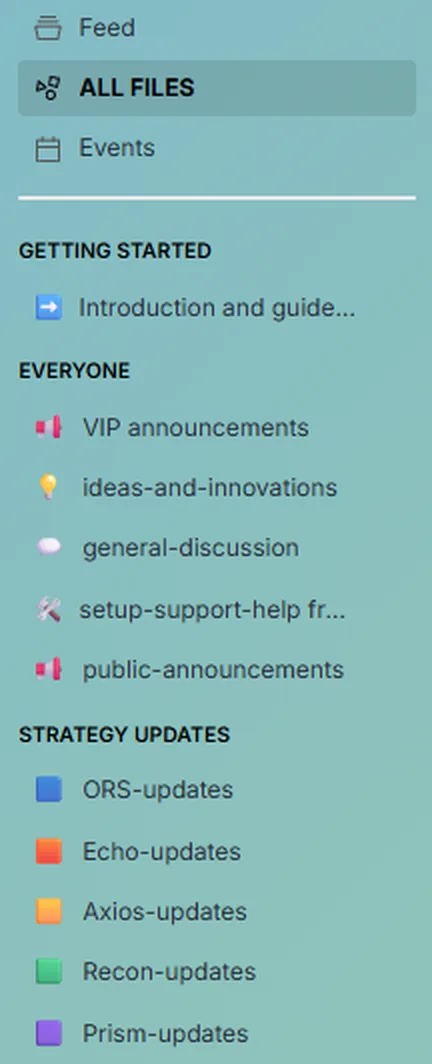
Alongside setup and support help, announcements, general discussion and ideas.
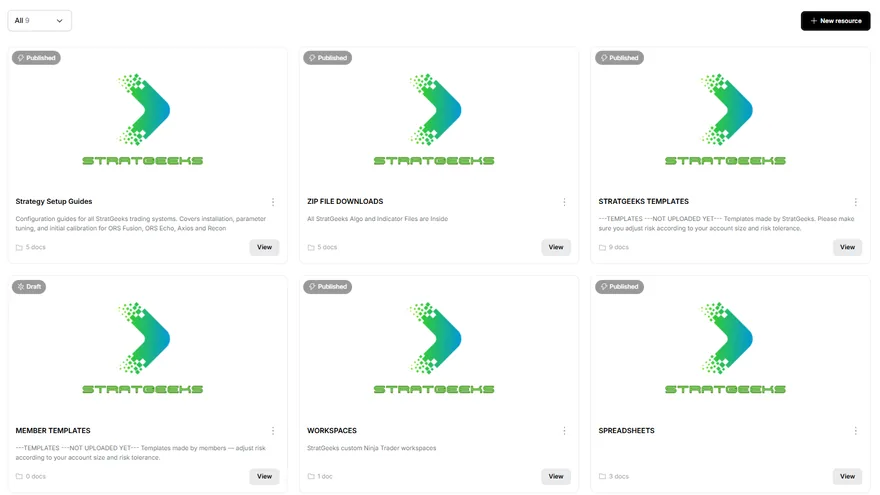
Setup guides, strategy downloads, official and member templates, workspaces and spreadsheets — each in its own place.
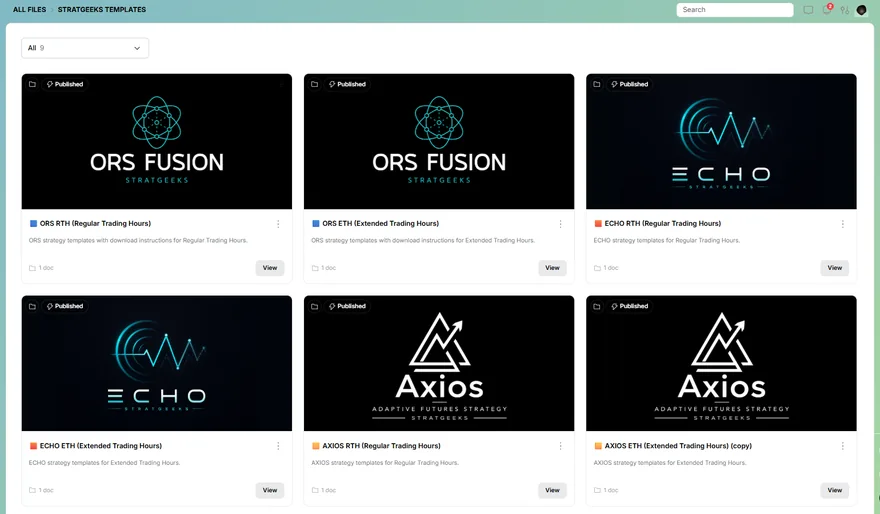
Official templates for each strategy, with separate sets for regular and extended trading hours.
Real screenshots from the Member Hub. Nothing here is illustrated or simulated.
From the member community
See what members are sharing.
Real conversations, screenshots, and account activity members have shared with us.
These screenshots were shared by StratGeeks members and by members with StratGeeks. They are individual experiences, not results StratGeeks produced or independently verified, and they are not typical or expected outcomes. Trading futures involves substantial risk of loss.
Member experiences are individual and are not necessarily representative of typical results. These materials are not a guarantee of future performance. Full Risk Disclosure →
Getting set up
Set yourself up. Get help when you need it.
Your membership gives you the files, templates and step-by-step instructions to get your system running on your own. It also includes a free 60-minute setup and review session if you have questions, missed something, or want to double-check your configuration.
Open the Member Hub and take the current setup guide, strategy file and template for the system you are installing.
Follow the guide in order to install and configure the system on your NinjaTrader platform, then load it on a chart and confirm it is running.
A free 60-minute session with every membership. Work through questions, cover anything you may have missed, and confirm everything is configured correctly.
Keep up with updates, new templates and files, announcements and the member community.
Free 60-minute setup & review session
Included with every membership. For questions, troubleshooting, anything you may have missed, and a check that your configuration is right. Day-to-day setup and strategy questions also go to the support channel in the Member Hub, where the answers stay visible for everyone.
Additional private 60-minute session
Booked separately, for deeper optimisation help, extra configuration work or ongoing assistance beyond the included setup and review session.
More than the strategy
The strategy is only part of what you get.
When you become a StratGeeks member, you get more than the strategy file. We provide the setup materials, configuration tools, spreadsheets and educational resources that help you understand how the system works and how your chosen configuration affects risk.
Strategy & setup
Your strategy files, templates, setup guides and configuration instructions.
Risk & position sizing
Spreadsheets and tools to help you understand contract sizing, tick values, risk per trade, strategy risk and account parameters.
Learn & review
Educational material, setup guidance and your included 60-minute setup & review session.
Tools you can actually use
Drag a sheet sideways to read it in full.
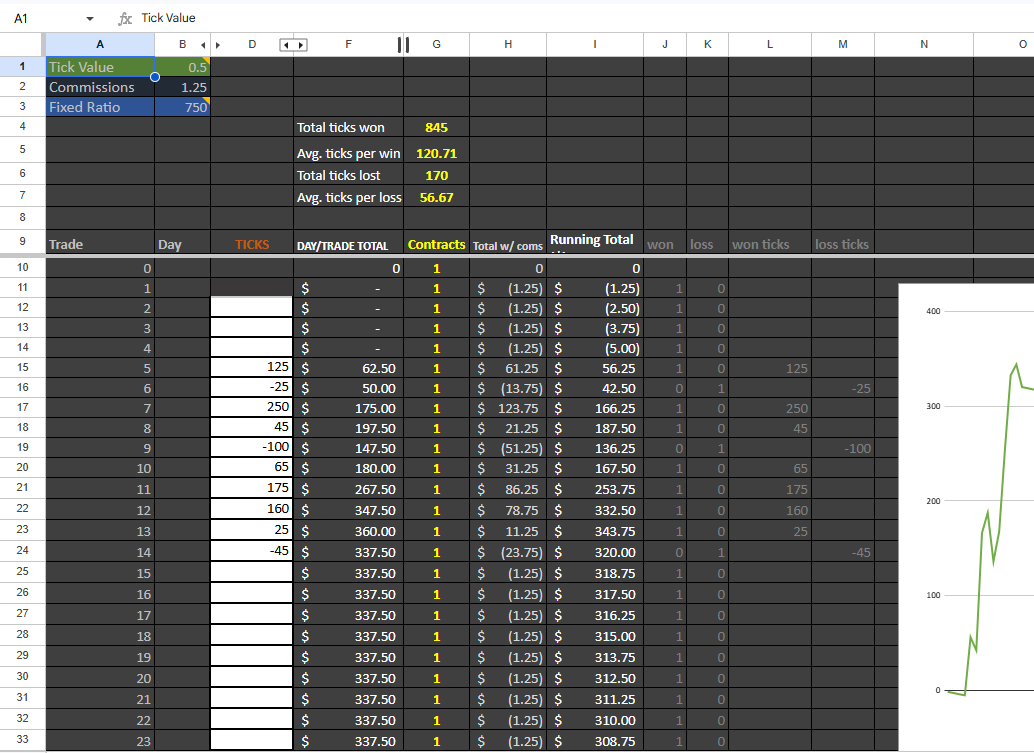
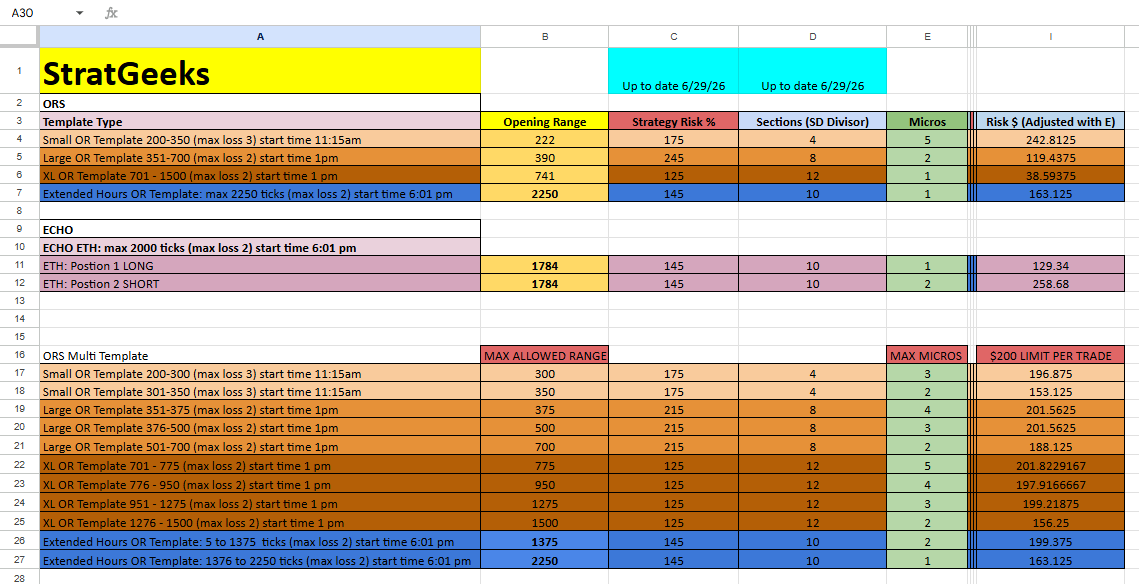
Know what you’re trading. Know what you’re risking.
Every membership includes
Everything you need to run the system.
Your system
- Your strategy
- Optimised configurations
- StratGeeks templates
- Free strategy updates
Member Hub
- Member templates
- Files and downloads
- Setup guides
- Community chat
- Announcements
- Ongoing support
Set up with confidence
A free 60-minute setup & review session
Set it up yourself using the guides and templates, then use the included session to ask questions, troubleshoot, or have your configuration reviewed.
Want to talk to a real person?
You don’t need to talk to us to get started. But if you want to, we’re here.
