



Defined rules. Real control.

Fully automated trading.
Fully understood.

Automated trading systems built from defined rules — not a black box. See how the system works, understand why it behaves the way it does, and configure the parameters that matter to you.

Want to ask something first? Join the Discord and ask us.

The StratGeeks Suite

Get the whole thing.

Access more than one StratGeeks system in a single membership. Templates, free strategy updates, the Member Hub and the included setup session come with it.

ORS: Fusion AXIOS ECHO
RECONComing soon
SnapBackComing soon
SurgeComing soon
BOTATM Pass AlgosComing soon
PRISMComing soon
AXIOS IndicatorComing soon
Suite plans of 3 months or longer include future StratGeeks products released during the term · pricing is on the Plans page

How we build

Testing matters because live trading matters.

StratGeeks systems are built from defined rules and tested on real market data — traditional candlestick charts, with execution assumptions built around how we expect the system to behave live.

01

Defined rules

Every strategy is built from rules you can read, configure and test. You can see what it is doing and why.

02

Real market data

Testing is done on traditional candlestick charts, using actual market movement rather than artificially constructed price data.

03

Realistic execution

We use limit and market orders based on what the strategy needs, so testing reflects how orders are expected to fill.

Rules you can see, and settings you can actually change. Every StratGeeks strategy is built from defined rules you can read, understand and configure. There is no black box deciding what happens behind the scenes — you can see what the system is doing and why.

And there is a lot you can configure. Entries, exits, targets, stops, filters, position sizing and the rest of how a system behaves are all adjustable. The point is not to hide the complexity from you. It is to give you real control over a system that has been properly worked out.

The goal is simple: build and test the system we actually intend to trade.

Real data. Real tests.

See what the rules actually produced.

Plenty of vendors say their systems are backtested. Fewer show you the output. This is a real Strategy Analyzer result from a StratGeeks system, straight out of the platform.

Strategy Analyzer output

Cumulative net profit, over the tested period

Not a graphic we drew. This is the platform's own chart, including the flat weeks and the drawdowns, from one system over one instrument and one date range.

See the full evidence →

Drag a capture sideways to read it in full.

ORS: Fusion V2.7MNQ 09-26NinjaTrader Strategy Analyzer21 Apr – 20 Jul 2026

Historical testing output. It shows what these rules did over this instrument and this period — nothing more. Past results are not a prediction of future results, and a backtest is not live trading.

Hypothetical / simulated performanceHypothetical results have inherent limitations and do not represent actual trading results. Past performance does not guarantee future results. Full Risk Disclosure →

The systems

Explore the systems.

They all trade the same markets and can be configured for regular or extended hours. What differs is how each one approaches the market. The Products page goes through them properly.

Available now

Coming soon

Each system reads the market a different way. Compare them side by side.

Explore all systems

Automation without giving up control

Let the system do the work. Step in when you want to.

Run a StratGeeks strategy fully automated, use it manually, or take control of an individual trade when you want to. Adjust a stop, move or extend a target, take a trade off, or hold it longer. The system gives you the rules. You decide how much control you want to use.

Automated doesn’t mean locked in.

From StratGeeks

See the systems in action.

Videos covering the systems, setup and configuration, and how we test. If you would rather watch than read, start here.

Watch on YouTube →
Systems

A system running, with the settings that produced it shown.

Watch on YouTube →
Setup

Installing and configuring a strategy on NinjaTrader.

From the member community

Real things members have shared with us.

Screenshots, Discord conversations, payout certificates and account activity that members chose to share with us.

Drag or scroll sideways·Select any card to enlarge it

These screenshots were shared by StratGeeks members and by members with StratGeeks. They are individual experiences, not results StratGeeks produced or independently verified, and they are not typical or expected outcomes. Trading futures involves substantial risk of loss.

Member experiences are individual and are not necessarily representative of typical results. These materials are not a guarantee of future performance. Full Risk Disclosure →

Membership

More than the strategies.

Your membership grows with the strategies. Start with optimised configurations, templates and the resources to get going. As the strategies evolve, the updates are included. Your files, guides, community and support live in one place, and every membership includes a free 60-minute session to help you get set up and check everything is right.

Included with every membership

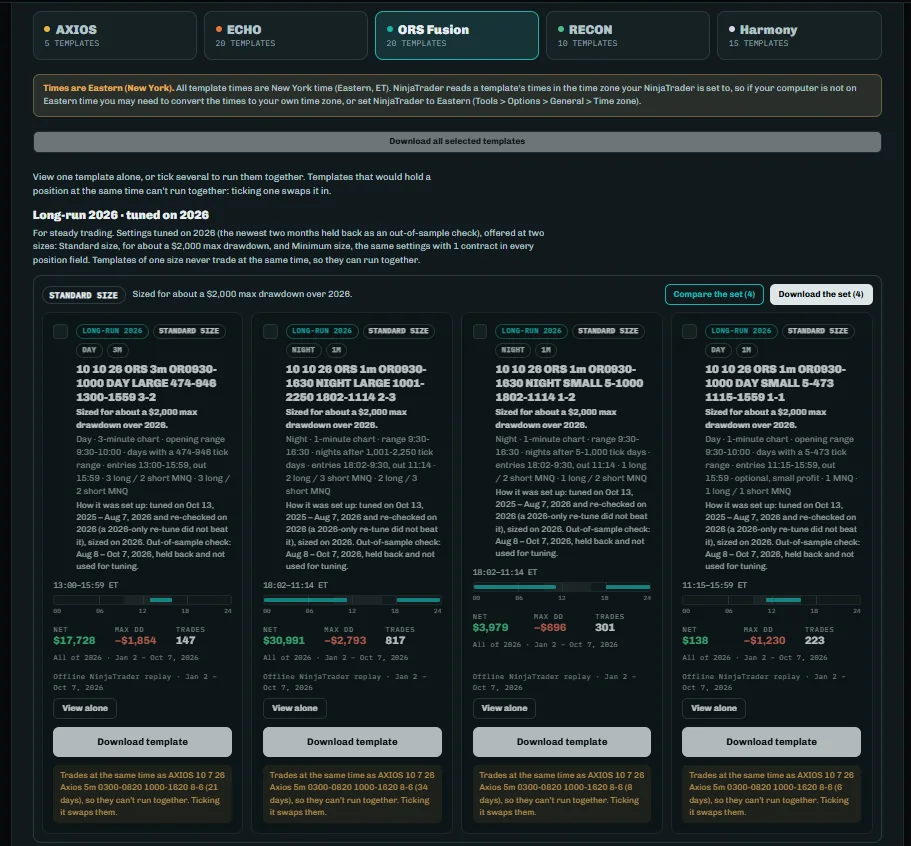
Templates

Every strategy comes with StratGeeks templates, including optimised configurations to start from. Templates have always been free for StratGeeks members — not an upgrade, not an add-on.

StratGeeks Templates

Official templates provided with the strategies, including optimised configurations.

Member Templates

Configurations shared by other members inside the VIP member area, kept clearly separate from the official ones.

Included with every membership

Free strategy updates

Strategy updates are included with your membership. As the strategies evolve, members get the updates — you do not buy the next version separately.

Included with every membership

The StratGeeks Member Hub

Strategy files, setup guides, templates, workspaces, spreadsheets, updates, announcements, community chat and support — organised in one place.

Included with every membership

A free 60-minute session

Set yourself up first, then use your included setup and review session for questions, anything you may have missed, and a check that your configuration is right.

Every membership includes

Everything you need to run the system.

01

Your system

  • Your strategy
  • Optimised configurations
  • StratGeeks templates
  • Free strategy updates
02

Member Hub

  • Member templates
  • Files and downloads
  • Setup guides
  • Community chat
  • Announcements
  • Ongoing support
03

Set up with confidence

A free 60-minute setup & review session

Set it up yourself using the guides and templates, then use the included session to ask questions, troubleshoot, or have your configuration reviewed.

Inside membership

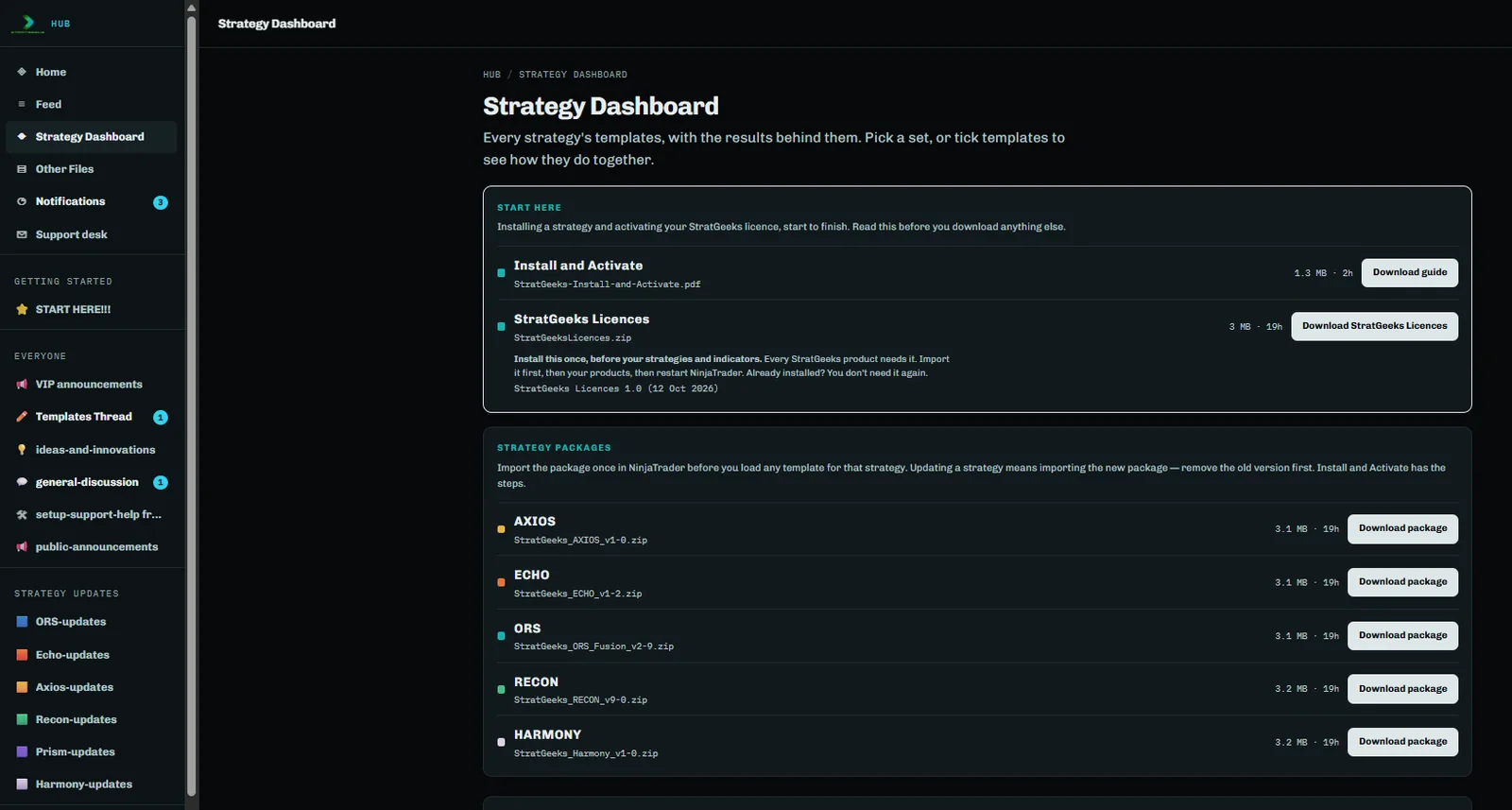
A look inside the Member Hub

One place for your files, templates, setup guides, updates and community. The Member Hub runs on Heartbeat, and it is organised so you can tell where something lives before you go looking for it.

The Member Hub sidebar, showing the Getting Started, Everyone and Strategy Updates channel groups.
Channels Every system has its own updates channel

Alongside setup and support help, announcements, general discussion and ideas.

The All Files area of the Member Hub, showing the resource categories.
All Files The resource library

Setup guides, strategy downloads, official and member templates, workspaces and spreadsheets — each in its own place.

The StratGeeks Templates folder, showing template sets for each system split by regular and extended trading hours.
Templates Split by system, and by session

Official templates for each strategy, with separate sets for regular and extended trading hours.

Real screenshots from the Member Hub. Nothing here is illustrated or simulated.

Getting set up

Set yourself up. Get help when you need it.

You have everything you need to get started on your own — the files, templates and step-by-step setup resources. Every membership also includes a free 60-minute setup and review session if you have questions, missed something, or want to double-check your configuration. Included, not mandatory.

Step 01
Get started

Access your strategy, setup instructions and templates in the Member Hub.

Step 02
Set it up

Follow the guides and configure the system on your NinjaTrader platform.

Step 03 · Included
Your setup & review session

A free 60-minute session, included with every membership, to work through questions, cover anything you missed and confirm the configuration is right.

Step 04
Stay connected

Keep up with updates, new templates and files, announcements and the member community.

Included

Free 60-minute setup & review session

Included with every membership — for questions, troubleshooting, anything you may have missed, and a check that everything is configured correctly. Use it whenever you are ready.

Optional

Additional private 60-minute session

Booked separately, for deeper optimisation help, extra configuration work or ongoing assistance beyond the included setup and review session.

Real people

There is a person on the other end.

StratGeeks is a small company. The systems, the templates, the setup guides and the answers all come from the same people who built them.

Ready to get started

Three ways to go from here.

Get the StratGeeks Suite

The whole Suite in one membership, with everything that comes with it.

See Suite plans

Explore the systems

Read how each system approaches the market, and start with one if you already know which fits how you trade.

Explore all systems

Get set up

See what every membership includes, how setup works, and what the free 60-minute session covers.

See the experience

Want to talk to a real person?

You don’t need to talk to us to get started. But if you want to, we’re here.

Technology

NinjaTrader

StratGeeks strategies run through the NinjaTrader platform.

Scroll to Top